
In the emWave2 software you export session data one session at a time. Go to the Review Progress screen, and double-click on the session you want to export. Do a Copy, then Paste into a blank Excel worksheet.
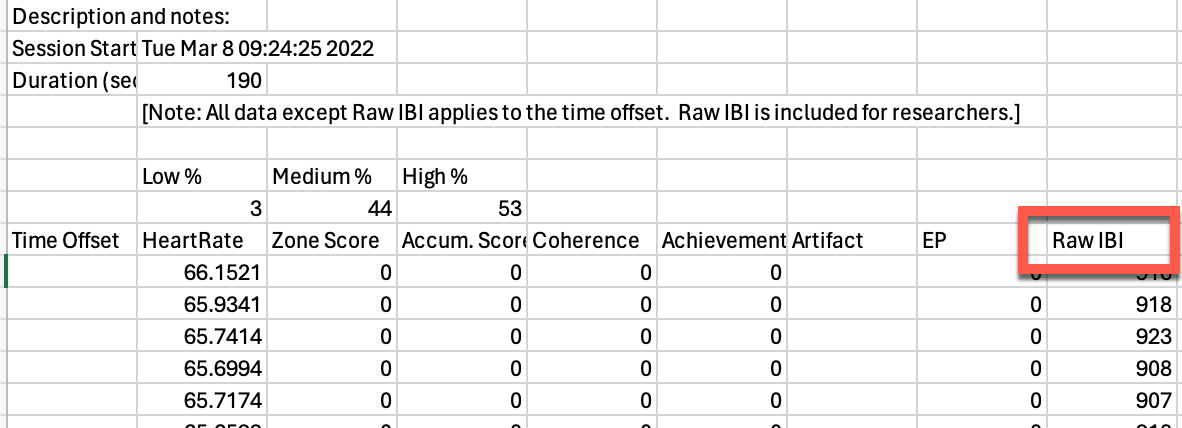 Delete everything except the Raw IBI column, then save as a .TXT file.
Import this file into Kubios for HRV analysis, Get the free version of the program here:
Free Kubios Software Download The emWave Pro software has a better export function, and you can purchase the software upgrade here:
emWave Pro Software
Delete everything except the Raw IBI column, then save as a .TXT file.
Import this file into Kubios for HRV analysis, Get the free version of the program here:
Free Kubios Software Download The emWave Pro software has a better export function, and you can purchase the software upgrade here:
emWave Pro Software
Delete everything except the Raw IBI column, then save as a .TXT file.
Import this file into Kubios for HRV analysis, Get the free version of the program here:
Free Kubios Software Download The emWave Pro software has a better export function, and you can purchase the software upgrade here:
emWave Pro Software